You finish your coffee and glance at your calendar—two meetings, client notes, a project deadline, and a kid’s field trip. How does anyone juggle all this without frying their brain? The reality of multi role organization isn’t about having the perfect app or flawless memory, but about building small, smart habits that help high-performers stay clearheaded no matter how many hats they wear.
Millions work across overlapping jobs, family schedules, or volunteer gigs. Each role pulls you in a different direction. Why do some people seem to glide through a multi role landscape while others drop balls? It usually isn’t extra hours or genius IQ; it’s about the way they handle information when their attention is split.
This article explores the working methods, cues, and checklists that high-performers rely on daily. Whether you’re balancing leadership with parenting or blending side hustles with studies, you’ll find stories and steps to sharpen your own multi role organization strategy.
Start with Visible Buckets, Not Perfect Systems
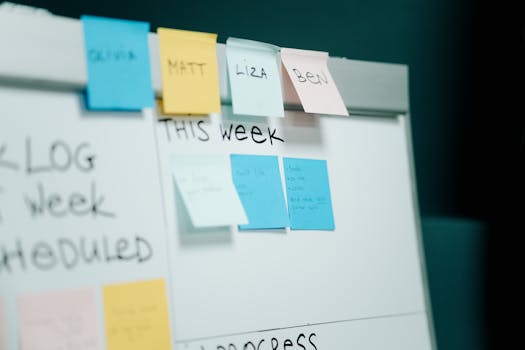
Multi role organization becomes easier when every role gets its own visible space. Before chasing productivity hacks, try this rule: organize by visibility first, perfection later.
Two quick observations: Many begin with apps or folders but forget where they’ve stored things after a week. Visual signals keep things top-of-mind and accessible, even when you’re distracted by a dozen other priorities.
The “Bucket” Rule in Real Life
Imagine you run both a side freelance business and your kid’s soccer team. You keep a blue pad for work notes and a red one for team reminders on your desk. Glance across your workspace and you instantly know where to jot new ideas—no mental searching, no file chaos.
This reduces friction. The quick color cue means less brainpower wasted, so you’re free to focus on actual tasks.
When to Move a Bucket Online
Some information eventually deserves a digital home. After your blue pad fills up, set aside 10 minutes each Friday to scan, snap photos, or copy anything worth keeping into cloud storage. Use one color-coordinated digital folder for each role to mirror your physical buckets.
Actively review or purge these folders each month. Visual sorting rules make online data as manageable as what sits tangibly on your desk.
| Information Type | Physical Bucket | Digital Home | Takeaway |
|---|---|---|---|
| Project ideas | Blue notepad | “Work Ideas” folder | Transfer weekly for easy review |
| Kids’ activities | Red sticky board | Family calendar app | Sync every Sunday |
| Receipts/invoices | Envelope box | Expense tracker folder | Snap photo and upload monthly |
| Quick reminders | Index cards | Reminders list app | Clear old cards daily |
| Meeting notes | Meeting journal | Scanned PDF folder | Archive every other week |
Anchor New Habits with Short Schedules
High-performers rarely trust memory alone. They adopt micro-schedules—repeatable routines that trigger role-specific actions at set times.
One practical technique: Attach information-tidying habits to something you already do, like brewing morning coffee or powering down at night. You avoid overwhelm by making mini check-ins automatic.
Morning and Night Routines to Clear the Mental Deck
During breakfast, skim yesterday’s notes or transfer action items to a master list. At night, mark spent sticky notes for recycling and flag digital messages needing a reply tomorrow. The repeated sequence means nothing slips through unnoticed.
- Write the day’s three must-dos on a visible list: quick clarity for your main roles.
- Update digital folders before emailing or messaging: prevents scrambling for attachments.
- Review calendar invites as you brush your teeth: prime your mind for commitments.
- Drop spent index cards in a recycle tray before bed: clears physical clutter fast.
- Send yourself one “tomorrow” note on your phone after work ends: jump-starts the next role’s focus.
Try running this checklist for one week. Most people report less end-of-day anxiety and fewer lost notes—and more evening focus at home.
Pacing: Why Less is More with Micro Schedules
If you’re tempted to overhaul all routines at once, pause. Sustainable multi role organization calls for a one-change-at-a-time approach. Pick just one slot—either morning or evening—and anchor it for two weeks before adding anything new.
- Choose the earliest recurring event and ‘pair’ a review habit to it: ensures daily consistency without forgetfulness.
- Allow 5–10 minutes only: tight boundaries limit distraction and help you show up for multiple roles feeling prepared.
- Skip your lowest-priority review at least one morning per week: proves flexibility, preventing the system from feeling like another burden.
- Once anchored, increase detail or frequency only as needed: keeps routine simple and built to last through busy weeks.
- Tell a friend or partner about your new micro-schedule: external cues increase follow-through rates significantly.
Test a “pause and tweak” period every two weeks to refine what actually supports your workflow.
Keep Roles from Blurring Using Context Cues
One of the sneakiest derailers in a multi role organization setup is information bleed—notes from one area trickling into another, blurring the lines until it’s hard to focus.
Physical and Digital Signals to Mark Role Shifts
Consider how teachers ring a bell or doctors hang their white coats in the hallway. Translating this to role management: Build a small “reset ritual” whenever you move between modes. For example, after finishing work emails, close the laptop and slide it into a bag before switching to family paperwork.
Digitally, use unique wallpaper backgrounds, browser session profiles, or separate login avatars for each major role. These context cues prime your brain, signaling which hat you should be wearing at that moment.
Scenario: When Multiple Roles Collide
Imagine Tim, a community volunteer who is also the primary caregiver in his house. School news comes in just as he’s prepping minutes for a civic meeting. Instead of handling both at once, he shifts his phone to “parent” mode by opening a family-only calendar. When finished, he swaps back to work emails via a separate browser window labeled “civic” with a green tab.
Tim later reflects: “Switching visible cues felt odd at first, but it cut my mental toggling—now I’m where I need to be, one role at a time.”
Capture Notes Fast, Then Sort at Set Times
Ideas strike at random. High-performers don’t aim to sort everything in the moment; they focus on speedy capture, then process in focused, scheduled batches.
Rather than trusting memory, keep a catch-all inbox—notebooks, digital notes, or even voice messages. Only later do you label, move, or delete. This method reduces cognitive load during busy shifts between roles.
“Bundle and Batch” Technique: Live Example
Let’s say you’re with your kids and remember a client email you owe. Instead of stopping family time, you speak a voice memo or add a short dash note in your catch-all app. After dinner, you batch-process these quick captures—transferring work notes to your “professional” folder, discarding family messages as needed.
The takeaway: Don’t sort on the fly; batch it at predictable intervals.
Checkpoints for Effective Batching
Set alarms or link your batching habit to another recurring event, like a daily walk or commute. This prevents notes from festering in your inbox or notepad for weeks.
If you skip a session, consider it a sign to simplify—remove or condense categories so processing stays breezy and you remain ready for whatever role comes next.
Reduce Overwhelm by Saying “Not Now” (and Mean It)
Even the sharpest multi role organization system fails if you never say no or “later.” High-performers protect their boundaries by parking lower-priority tasks and revisiting them only during scheduled review blocks.
An instant decision trick: If you don’t have time, write “park” next to a task. Whenever a new role clamors for attention, scan your list for anything flagged ‘parked’ and move only when bandwidth allows. This habit keeps guilt at bay and priorities fresh.
Why “Park It” Works for Multi Role Organization
This approach resembles a traffic sign: pausing one thing allows another to pass safely. The psychological relief frees up creative energy for what needs you most right now, with no loss of information.
In a quick experiment, set aside everything non-urgent into a “parking” file for two days. You’ll likely notice greater focus—and often, some items simply expire and disappear with no harm done.
Use Micro-Checklists as Role-Specific Anchors
Juggling roles means details slip faster. Micro-checklists (as short as three items) keep repeated tasks on autopilot without draining willpower. They’re especially useful for transitions: switching from conference calls to helping kids with homework, or prepping for a volunteer duty after work.
Checklist Building: Rules for Each Role
Your checklist isn’t just about to-dos; it’s a trigger that marks your mind’s shift. For example, before school drop-off: mask, water bottles, permission slips. Before a client video call: camera check, notepad open, water at hand. Each routine affirms the role you’re taking on.
Keep these micro-checklists visible—on the wall, sticky notes, or phone lock screen—so they always stand out when needed most.
Conclusion: High-Performers Make Information Easy to Find
Stepping across multiple roles each day, high-performers minimize friction—not by chasing complexity, but by anchoring their multi role organization habits in daily routines, simple cues, and visible systems.
Every practical rule described here comes down to one principle: Make the vital information for each role easy to spot, act on, and tidy up. The visible buckets, tiny schedules, reset rituals, and micro-checklists together support sharper decisions with less effort.
Pick just one or two of these strategies to try this week—start small, anchor them in a routine you already have, and enjoy the knock-on effect of a clearer, easier multi role life.